
Paper on the course.
Detail in the results.
Keep the familiar paper scorecard workflow while bringing target-by-target results into iClays. iScan connects Scantron scoring with the detail needed to recognize more of a shooter’s round.
Level 3 scoring resolution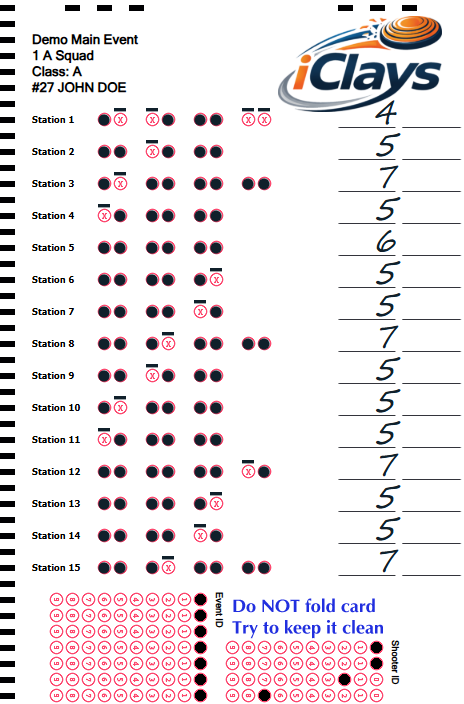
Scantron Single Sporting · Completed John Doe sample
1. Score on paper
Record results on the event’s compatible scorecards, preserving the individual target outcomes.
2. Scan the cards
Process the completed cards through the iScan Scantron workflow. Results become available as cards are processed after they return.
3. Reveal the round
Use the recorded target sequence to build station totals, overall results, and eligible accolades.
When the score tells more of the story
A total of 89/100 tells you the outcome. Station totals show where those hits happened. Target-by-target results can reveal a strong opening pair, a strong finish, or a long run crossing station boundaries.
iScan is useful when a tournament wants to keep paper scoring on the course, including venues where course-wide connectivity is limited. Scanning records the scores after cards are processed; it does not provide live tablet updates from each station.
What the demo shows
See a completed John Doe card produced by the actual Single Sporting generator: filled hits, dashed misses, and handwritten station totals. The visible marks and totals help make score changes noticeable. This demonstration does not scan or upload a card.
Compatible card layouts, scanner configuration, and event setup are part of the iScan workflow. Damaged or manually entered cards may provide a lower level of detail.
Explore scoring resolution and accolades